
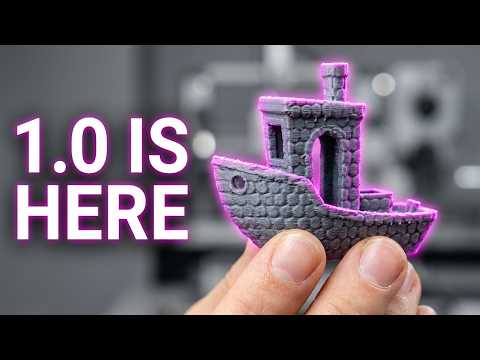
What Is BumpMesh and Why Does It Matter?
Adding 3D print textures to functional parts just got easier. BumpMesh is a free tool that converts images into physical surface textures on 3D printed components. CNC Kitchen, a popular engineering-focused YouTube channel, recently highlighted major improvements to this software.
For engineers and product designers, surface texturing serves critical functions. Textures improve grip on handheld devices. They hide layer lines and cosmetic imperfections. They also create visual branding without paint or post-processing.
How BumpMesh Works for Industrial Applications
BumpMesh takes any grayscale image and applies it as a displacement map to STL files. Lighter areas become raised surfaces. Darker areas remain recessed. The result is a physically textured part ready for manufacturing.
Recent updates make the tool more powerful for production use:
- Improved mesh quality reduces artifacts in fine details
- Better UV mapping handles complex geometries
- Faster processing speeds for batch operations
- Enhanced control over texture depth and scaling
Practical Benefits for Functional Parts
Surface texturing isn’t just cosmetic. Engineers use textures strategically to solve real problems. Grip patterns on tool handles reduce slippage. Diamond knurling on adjustment knobs improves torque transfer.
Textures also mask surface imperfections inherent to additive manufacturing. This reduces post-processing time and cost. Parts go from printer to assembly faster.
Design Considerations for Textured Prints
Not all 3D printing processes handle textures equally. Multi Jet Fusion and Selective Laser Sintering excel at fine surface details. Their powder-bed processes capture intricate textures without support material interference.
Consider these factors when designing textured parts:
- Texture depth should not compromise wall thickness
- Orientation affects texture quality on different faces
- Minimum feature size depends on your chosen process
- Post-processing may fill or soften fine textures
Understanding why orientation matters in 3D printing helps you position textured surfaces optimally.
When to Use Physical vs. Printed Textures
Physical textures built into STL files differ from surface finishes applied after printing. Built-in textures offer consistency across production runs. They require no additional labor or materials.
Post-processing textures like bead blasting or dyeing offer different benefits. They cover entire surfaces uniformly. Learn more about ways to improve 3D printed part appearance for your application.
Production Applications for Surface Texturing
Industrial manufacturers use surface texturing across many applications. Consumer electronics benefit from soft-touch textures that improve handling. Medical device housings use antimicrobial surface patterns. Automotive interior components feature branded textures that replace expensive secondary operations.
The key advantage is design consolidation. Instead of adding grip tape or rubber overmolds, the texture becomes part of the printed geometry. This reduces assembly steps and bill of materials complexity.
Getting Started with Textured Parts
BumpMesh provides a free entry point for experimenting with surface textures. Test your designs on sample parts before committing to production volumes. Evaluate how different textures perform under real-world conditions.
When you’re ready for production-quality textured parts, JawsTec offers industrial 3D printing services optimized for surface detail. Request a quote to discuss your textured part requirements with our engineering team.
Surface texturing transforms functional parts into finished products. Tools like BumpMesh make this capability accessible to any design workflow.
Sources
Source: Half a Million Views Later… BumpMesh Is Way Better by CNC Kitchen (YouTube) — https://www.youtube.com/watch?v=Y_vkCFwDIBY